h1

Welcome to Stop Shooting Auto!

December 10, 2008

Exposure Mode DialStop Shooting Auto! is a set of photography lessons and associated articles, mostly dealing with getting the correct exposure. The lessons are very friendly to beginners who know very little about photography. If you’re scared to take your camera out of green box mode because you have no idea what the controls do, this is the site for you.

If you’re new here, you’ll want to start by going through the Exposure Lessons in Order. They’re the real meat of the site. Don’t forget to do the exercises so that you practice what you’ve learned. Practicing and experimenting is the best way to really understand what’s going on.

Other interesting articles that don’t specifically deal with exposure lessons can be found in the Index of Entries.

Please feel free to ask questions and leave comments– I like getting reader feedback! If you’ve learned something from the site, let me know. And please spread the word, since more readers make me a happy Patti.

About these ads
h1

I just got a digital SLR. What do I do now?

January 2, 2013

If you’ve been a very good boy or girl, Santa Claus might have left a digital SLR under the tree for you. Maybe you know nothing at all about photography, or maybe you’ve been shooting with your phone or with a point & shoot camera for a while, and now you have this fantastic new camera. What’s your next step?

A lot of photographers will give you a lot of different advice. Some will tell you that the first thing you should do is read the camera’s manual from cover to cover. Others will tell you that you absolutely have to replace the kit lens with something better. If you have exceptionally smart friends, the first thing they’ll do is send you to this website and tell you to learn about exposure. :-)

From where I sit, they’re all wrong– even the ones who sent you here. Let me explain why.

Reading the manual is great if you already have a good understanding of photography and you just want to know the specifics of the individual camera controls. Even then, it’s going to be way too much information for you to absorb all at once– it will be trying to drink out of the proverbial fire hose. Plus, the manual will tell you what all the buttons and menus and doodads and doohickeys do, but it won’t give you much of an understanding of why you’d want to do any of those things. So do read the manual, but only as much as you need so that you can turn the camera on and take some pictures. Once you get that far, stop reading and put the manual away in a safe place.

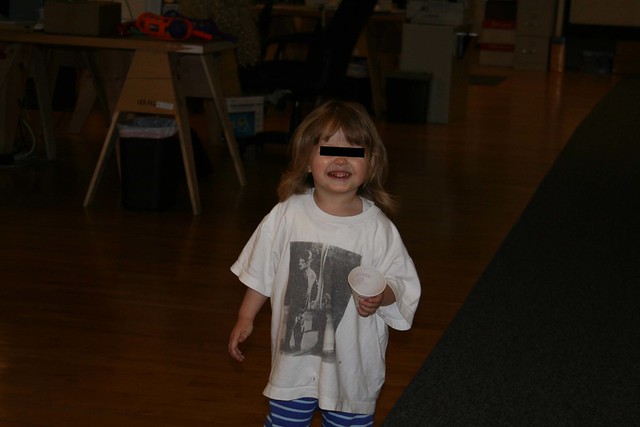
People are right that the kit lens that came with your camera probably isn’t very good. Who cares? If you’re a beginning dSLR owner, you won’t be very good either. I wasn’t. You want to see how bad I was? This is the very first image that I took with my first digital SLR.

IMG_0001_obfuscated

I think she’s the daughter of a coworker, but I’m not sure– hence the black bar on her eyes. It’s a great picture, isn’t it? Yeah, OK, not so much. The second one isn’t much better– it’s a photo of the lens cap. I kept at it, though, and a few months later when I visited Alcatraz and shot this gem:

IMG_0595

OK, at least it’s properly exposed. The focus leaves something to be desired, though. I think I was trying to capture the geometry of the tank, but I failed miserably.

The general philosophy over here at Stop Shooting Auto! world headquarters is that you should only buy new camera gear when you have a specific need that isn’t being met by your current equipment. If your lens really isn’t good enough, then by all means go invest in a better one. When you’re shooting at this level of competence, though, it’s not your equipment that’s holding you back.

As for reading this website, well… I happen to think it’s a damned fine site full of useful content, and it’s one that every beginner should get to eventually. If you just got the camera, though, you should wait a little bit before you dive in here.

So now that I’ve told you what not to do, I guess I should say something positive. The thing you should do more than anything right now is go take some pictures! The very best way to learn is to go out and practice, and experiment. You’ll get lots of really horrible photos, but that’s OK. Nobody has to see them unless you publish them on the web so the whole world can see how horrible you were when you first started out. (Ahem.)

Spend a few minutes looking at your pictures afterward. Are they good? Bad? What makes the good ones better than the bad ones? Can you identify the problems with the bad ones? You don’t have to know any technical language to do this– your eyes will understand. “This picture is too dark.” “This one is blurry.” “There’s a tree growing out of my friend’s head.” You probably won’t know how to solve these issues yet, but you’ll start to recognize common photographic problems. OK, the tree problem is easy to solve– don’t pose your friend where there’s a tree right behind his head.

After you’ve played around for a bit you’ll start to get a feel for what works and what doesn’t. That’s a good time for you to start reading. Dig into the exposure lessons here, and consult your manual when you need to know the specifics of how to do something on your particular camera. Take the time to do the exercises, since doing something is the best way to learn about it. Keep shooting, and keep experimenting, and eventually you can become a pretty decent photographer.

But for now, stop reading. Stop lusting after equipment. Just go take a bunch of pictures and see what happens.

h1

Holiday Gifts For The Digital SLR Owner, 2012 Edition

December 10, 2012

It’s that time of year when we all shop until our credit cards drop, then shop some more just for good measure. To get into the holiday spirit, I’ve put together a few fun gift recommendations for your favorite dSLR owner.

Happy shopping, and happy holidays!

LensBaby Spark Available for both Canon and Nikon mounts, this is a great little lens for playing around. You can tilt it or squeeze it to change the focus and get all sorts of cool focusing effects.
Crumpler 5 Million Dollar Home camera bag. I love love love my Crumpler bag! It’s the perfect thing for toting around a camera and a couple of accessories. It’s water-resistant, very well padded, and exceptionally well made. The pockets are in the right places and made for the things I want to carry. For more room (and more moolah), try the 7 Million Dollar Home instead.

If you want to go completely crazy, there’s the Brazillion Dollar Home. I want one just for the name!

Giottos Rocket Air Blaster. This is a perennial SSA! favorite. It’s useful for blowing the dust off of your gear, and for cleaning your sensor. You can also use it to blow the hair out of your face, annoy your cat, or any number of things.
DGK Color Tools Gray, Black, and White Cards.It’s always useful to have an 18% gray card in your bag, for setting white balance in difficult or unknown lighting situations. This one also comes with black and white cards as well for handling dynamic range. The set is waterproof and comes with a lanyard. At 4×5 inches, it’ll slip right into your Crumpler bag.


Gary Fong Puffer Pop-Up Flash Diffuser. Pop-up flash stinks, but most digital SLRs have one. This diffuser works surprisingly well for turning that harsh on-camera light into something softer and less obnoxious. I bought one this year when I was lending a camera to a friend, and I was surprised by how well it worked.

h1

Autofocus and Portraits

December 5, 2012

I want to talk specifically about autofocus when shooting portraits. To start off, let’s go back to the teddy bear portrait studio that I set up recently and look at a couple of example shots.

NoseFocus_f2

EyeFocus_f2

If you’re like most people, you’ll perceive the second image as being better than the first… the first one will probably seem like it’s not quite right, even if you can’t put your finger on why. Since this is an essay about focus, though, you probably spotted the difference pretty quickly– in the first image, the bear’s eyes are slightly out of focus, while in the second one they’re sharp.

As I mentioned earlier, shooting portraits can be tricky when you’re using your camera’s autofocus. Portraits are often shot with a fairly shallow depth of field, since you want your viewer’s attention to be on your subject and not on the godawful tiger-striped background that you’ve posed them against. (Again, don’t do that.) It’s extremely important that the subject’s eyes be in focus for portraits, because… well, because I said so and because every other photographer does too.

Here are a couple of closeups that illustrate the difference in my bear images.

NoseFocus_eye EyeFocus_eye

In the image on the left, the nose is in clear focus, but the eye is blurry. On the right, the eye is in sharp focus but the nose is a little bit soft. Why the difference?

In the first image, I just let the camera pick its own focus point. It naturally gravitated toward the center of the image, found a nose that it could grab onto, and used that as the focus point. That’s great if you happen to have a weird fetish for noses, but it’s not great for portraits. In the second image, I told the camera that I wanted to use a specific autofocus point only, and then plunked that focus point right on the bear’s eye. Voila! I got exactly the shot I wanted.

If you can put a focus point right on one of your subject’s eyes, then do that. Some cameras have only one or a few autofocus points. Others, mostly high-end cameras, have eleventy billion of them scattered across the image. (IF you want to see this carried to an extreme, check out the 61 autofocus points on the Canon 5D Mark III. Also, if you’d like to give me one I will be happy to put each and every one of those autofocus points to good use.) As always, check your camera’s manual to figure out how to choose individual focus points, as the controls can vary quite a bit between manufacturers and even between different cameras from the same manufacturer.

If you can’t find an autofocus point that works, then you’ll just have to resort to manual focus. By now you probably know that it’s not so scary. Just flip the camera into manual focus mode, then turn the dial until you get what you want.

Thus endeth my wisdom about focusing for shooting portraits. I have one other topic to cover before I put autofocus to bed, but I’ll save that for another day.

h1

What to do when autofocus deserts you

December 4, 2012

You’ve framed your image. You’ve pressed the shutter button and taken the shot. You quickly review the image on the camera and find out that your subject is horribly out of focus. What do you do? You have a few different tools at your disposal for showing the camera that you’re the boss of it, and different ones are useful in different situations.

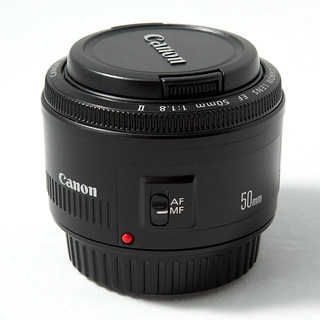
50mm f/1.8 Manual Focus The first thing you can do is switch to manual focus mode. That’s probably really obvious, but if you’re in the habit of relying on autofocus for everything it might not occur to you that you can do it yourself. Flip the lens or camera into manual-focus mode (depending upon your camera), then grab the focus ring and twist it until you get exactly what you want. If you’re using a zoom lens you might find yourself habitually grabbing for the zoom ring rather than the focus ring, but practice a few times and you’ll eventually start getting the right one automatically.

The advantage of manual focus is that you’re in complete control of the focus. The downside is that it’s sometimes hard to tell when your image is precisely in focus. This is especially true with cropped-sensor cameras that have smaller viewfinders. Many cameras will light up a focus point when that part of the image is in focus even when you’re using manual focus, so you might be able to use that as a guide.

If your image is static, you can use the camera’s LCD as an assistant. Focus, take a shot, then view the image on your camera’s LCD screen. Zoom in on it and scroll around to see if the right parts of it are in focus. If not, correct the focus and try again. (In a competition between film and digital, film would lose hard on this point.)

Many lenses have distance scales on the barrel. If you know that your subject is six feet away from the camera then just turn the focusing ring on the lens until it’s focused at a distance of six feet. Voila!

The second thing that you can do is to use autofocus, but give your camera some extra guidance about what to focus on. Almost all cameras will let you choose one specific autofocus point rather than letting the camera pick its own. If you’re shooting a portrait, for example, you could choose an autofocus point that’s right over one of the model’s eyes. If you do that and the camera can find focus, then you’ll probably get the shot that you’re looking for.

Consult your camera’s manual for specifics of how to choose a focus point, since this can vary quite a bit between makes and models.

There’s a third strategy that will work well in some situations, but it’s a little bit tricky and doesn’t always get what you’re looking for. It’s called focus and recompose.

Imagine that you’re shooting an image with your subject in the bottom right corner of the frame, and your camera won’t focus on it naturally. With focus and recompose you point your camera directly at your subject, then press the shutter button halfway down so that the camera focuses on your subject. Keep holding the shutter button down while you move the camera back to the composition that you want, then take the picture.

Sometimes this works. It will probably do OK if you’re using a narrow aperture and therefore have a lot of depth of field. If you’re shooting a portrait, or shooting with the lens wide open, you probably won’t get what you’re looking for. Explaining why this is would require you to remember some of your high school geometry and do some math, so I won’t explain the details here. The short answer is that when you move the camera you’re changing the distance to your subject ever so slightly, and that might be enough to make your subject go out of focus.

And there you go– you now have three tricks that you can use for showing your camera who’s boss when you’re trying to focus. I recommend that you go practice each of them, so that you’ll have them ready to go the next time your camera gets some crazy ideas about what to focus on.

h1

When is autofocus likely to get it wrong?

December 2, 2012

Most of the time, autofocus will do a really good job of getting your subject in focus. Even though I never put my camera in green box mode anymore, I usually leave autofocus on. I keep an eye on it, though, just to make sure that it’s doing what I want. This is especially true in tricky situations where autofocus might not be smart enough to get me the results I’m looking for.

Here are some situations where just blindly autofocusing might not be your best bet.

Medium f/2

You’re shooting through a fence or other foreground object. If there’s something in the foreground with strong lines, such as a fence, your camera is likely to focus on the foreground object rather than your chosen subject. In this example I’ve manually focused on the container and blurred the fence, but if I’d left it up to the camera I probably would have had a sharp fence and a fuzzy shipping container.

Pistil

Macrophotography. Macrophotography is challenging because you have razor-thin depth of field, so you have to pay careful attention to what parts of the image you want to have in focus. If you let the camera pick out what it wants to focus on, it will probably guess wrong. Serious macrophotographers generally use manual focus for everything.

Copyright Joe Decker, used with permission.

Everything in your image is soft. When everything in your image is cloaked in fog, your camera might not be able to find anything to focus on. This beautiful image from award-winning nature photographer Joe Decker is titled Tree Ballet and Pogonip, and is an excellent illustration of the foggy, soft image. This image is from his series Mono in Winter. See more of Joe’s work at Rock Slide Photography.

Your subject is extremely off-center. Again in Joe’s image, even if the trees hadn’t been shrouded in fog the camera might not be able to focus on them. Autofocus systems tend to be heavily weighted toward the center of the image. If you stick your subject way off in a corner then your camera is probably going to lose this particular game of hide-and-seek.

NoseFocus_f2

You’re shooting portraits. Portraits are often shot with shallow depth of field, but the subject’s eyes should always be in focus. It’s OK for the subject’s nose to be a little bit soft, and the ears can be downright blurry, but the eyes had better be crisp. If you let autofocus have its way then it might decide that it really wants the ears or the shirt or the background to be sharp, and leave the eyes shrouded in some of Joe’s mist. In this particular example, the camera got overly enthusiastic about the sharpness of the bear’s nose.

You’re shooting in low light. Autofocus often has a horrible time finding focus if you’re shooting in very low light. If you can’t see very well, your camera probably can’t either.

Those are some of the key situations where just trusting your camera to get the focus right might not be the best idea. In the next lesson we’ll see what we can do about autofocus problems.

h1

Exercise: Autofocus

December 2, 2012

Let’s play with our autofocus for a bit to get a feel for how it behaves. To start with, make sure your camera is set to use all of the autofocus points. If you’ve never changed this from the default, you should already have this set up. If you need to change this, consult your camera’s manual for specifics.

First exercise: Find an object that’s maybe three or four feet away from you, has sharp edges, and is reasonably well-lit. Turn the autofocus ring on your lens all the way to one extreme, so that you’re either focused on infinity or as close as your lens will go. Point the camera at the object, look through the viewfinder, and press the shutter button halfway. You should hear the lens whir, and you’ll see the object pop into focus. Pay attention to which of the autofocus points lights up. Now turn the viewfinder all the way to the other extreme and do it again.

Try this with faraway objects and nearby ones until you get bored with it.

Second exercise: Find a well-lit, solid-colored wall. Point the camera at it so that you have nothing else in the viewfinder besides the wall. Press the shutter button halfway and see if you can focus. You might be able to, but chances are pretty good that the camera will try for a while and then give up.

Third exercise: Find a piece of paper with some text on it, and put it somewhere with a decent amount of light. Alternately, you can use your computer screen. Get up close, so that the lens is only a couple of inches away from the print, then push the shutter button to try to focus. You probably won’t be able to. Pull back a couple of inches, and try again. Keep backing up a couple of inches at a time until the lens is able to focus.

So what did we learn?

In the first exercise, you watched the camera focus. Some lenses focus so quickly that you can barely see it happening. Other lenses are much slower and will take a significant fraction of a second to find focus. You got to see which autofocus points the camera used for different situations.

In the second exercise, the camera probably couldn’t find focus. If there were no surface details, the camera wouldn’t be able to find any edges, and therefore it wouldn’t be able to focus. The period of time when the lens was searching for something to focus on is called focus hunting.

Even one small feature like a nail hole on the wall would probably be enough for the camera to focus on.

In the third exercise, you found the minimum focusing distance of your lens. Every lens has a minimum distance at which it can focus, and if you try to focus on something closer it won’t work. Some lenses, especially macro lenses, can focus very very close. Others may require you to be a couple of feet away from your subject. The minimum focusing distance is probably written on the barrel of the lens.

I did this exercise with the Canon 50mm f/1.8 “nifty fifty” lens, which has a minimum focusing distance of 1.5 feet. My most extreme lens, the Canon MP-E 65mm macro lens, has a minimum focusing distance of around one inch. Sometimes a lens will have more than one minimum distance, and a switch that will let you control it– this is called a focus limiter. The Canon 70-200mm f/4L IS lens, my usual telephoto lens, can be set to either 1.2 meters or 3 meters. A focus limiter lets you help the camera focus more accurately by limiting the range at which the camera and lens try to focus. You don’t really need a focus limiter, but in some situations it can be a useful tool.

Now, go out and play! If you have more than one lens, try them all. Try focusing in a very dark room. Try focusing on something that’s not in the center of the image. Make up your own experiments and get a feel for how your equipment works. In our next lesson we’ll use this knowledge to help you focus in challenging situations.

h1

How Autofocus Works, a really simple explanation

December 1, 2012

In my last article, I posted this photo and asked you to identify what’s wrong with it:

IMG_3750

As it turns out, this is actually a really easy question to answer– the background of the photo is in focus, but the bear isn’t. Now, I’ll be the first to admit that teddy bears are supposed to be fuzzy, but this isn’t the kind of fuzziness that most people have in mind. The more interesting question here is why the camera got the wrong thing in focus. In order to do that, we have to learn a little bit about how autofocus works.

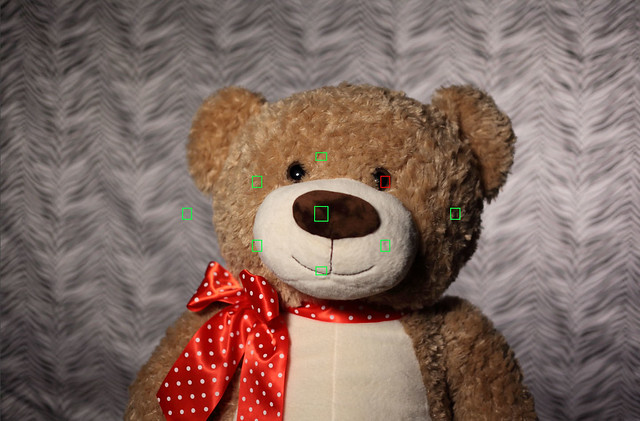
Before we do that, let’s try a little mini-exercise. Pick up your camera. Look through the viewfinder, point it at any interesting subject and press the shutter button halfway. You’ll probably see a display with a bunch of black boxes and some red ones. In this image I’ve colored the black focus points green so that you can see them better. Your camera might only have a few little boxes or it might have lots and lots of them. Those little boxes are called autofocus points:

EyeFocus_focuspoints

So how does autofocus work? It’s a complicated, highly-technical thing, but here’s the simplified one-paragraph version that will tell you most of what you need to know.

When you use autofocus to take a picture, the camera looks at each of the autofocus points and looks for areas of sharp contrast. The camera then changes the focus on the lens just a little bit and checks those points again to see if the contrast is better or worse. It keeps doing this, adjusting the focus a tiny bit each time, until it thinks it has the best focus. Once it does, it takes the picture. There’s a whole lot of black magic going on behind the scenes to make this happen, but that’s the really simple version.

The camera might choose to use all of the focus points if it can. More often, it will use one or a few of them to find the subject. As you’re looking through the viewfinder, the camera will light up an individual focus point if it’s happy with the focus in that area. If your camera is guessing wrong you can boss it around and tell it exactly which points to use, but that’s a subject for a different lesson.

So that’s it– when you autofocus, the camera looks at the areas in the little black boxes and then changes the focus on the lens until it’s happy with the results. That’s not so hard, is it?

Follow

Get every new post delivered to your Inbox.

Join 46 other followers