What’s that f-stop stuff anyway?

Newcomers to photography are often intimidated by technical jargon. Walk into a room full of photographers, or read camera reviews, and you’ll quickly be overwhelmed by seeming-gibberish about megapixels, spot metering, chroma noise, low-pass filters, A/D converters, sync speeds, and a myriad of other not-quite-English terms. If only you hadn’t cut Swahili class in high school, maybe it would make more sense to you and your head wouldn’t be swimming.

Of all the technical terms, nothing is scarier for the beginner than f-stops. I’ll do my best to demystify them for you.

First off, a simple English lesson. You’ve almost certainly heard the word aperture before… if you’ve been reading this blog, you’ve eve heard me use it. What exactly is it? An aperture is an opening, and specifically an opening that lets light in. In photographic terms, the aperture is the hole in your lens that lets light into the camera.

That wasn’t so scary, was it? No? Good. let’s keep going.

So what’s an f-stop? In a nutshell, it’s how big that opening in the lens is. That’s it. Really. It’s not some magical, mystical thing that’s going to bite you if you get it wrong. F-stops don’t hurt. They’re not contagious. They won’t kick your dog, drink your beer, or max out your credit cards. OK, they might max out your credit cards someday, but only if you start chasing really big ones.

How do the numbers work? Basically, a small number means that the lens has a very wide opening, and big numbers mean that the lens has a small near-pinhole opening. Of course, we remember that big openings let lots of light in, and small ones only let a little bit of light in. The most common f-stops you will encounter will be in the range of about f/2 to f/22. f/2 is a low number, so it’s a really wide opening. f/22 is tiny. Sometimes you’ll see numbers as low as f/1.4 (and if you have deep pockets, f/1.2), or as high as f/32 or occasionally f/45.

Something important to know is that when you aren’t actually taking a picture, your lens is always open to its widest possible opening even if you have the camera set to use a much smaller f-stop. This lets you get as much light as possible for focusing and composing the image. When you press the shutter button to take a picture, one of the things that happens is that little metal blades in the lens come out to make the opening smaller while the shutter is open. This happens automatically, and you don’t need to think about much about the details.

By the way, photographers tend to use the terms aperture and f-stop interchangeably. That’s OK.

Every lens has a minimum and maximum aperture, but they’re usually only rated in terms of the maximum– that is, the widest opening. For example, Canon sells two 50mm lenses. One is the 50mm f/1.8, and the other is the 50mm f/1.4. The first one can open as wide as f/1.8, which is really rather wide. The other goes as wide as f/1.4, which is even wider. (But you knew that!) Other than the maximum aperture, what’s the difference between the lenses? The f/1.8 lens is about $80, while the f/1.4 is about four times that price. Lenses with with very large maximum apertures are called fast lenses; I think it’s because of how quickly they drain your wallet.

Did that all make sense? Was it not too scary?

Tomorrow I’ll show you some pictures of what it looks like inside a lens, and show you a neat trick for checking it out yourself.

Oh, yeah. If you’re confused, feel free to ask questions in the comments. I’ll do my best to answer them.

Next lesson:  What does f/8 look like?

4 Comments

Filed under Aperture, Lesson

Quick review: what we’ve learned so far

There are three things that we can control that affect how a photo is exposed:

  • Shutter speed
  • Aperture
  • ISO

Shutter speed is how long the lens is open. Aperture is how wide it’s open. ISO is how sensitive the camera is to recording light.

If we leave the shutter open for a long time, a lot of light gets in. This is called a slow shutter speed. If the shutter is only open for a very brief moment, less light gets in and this is called a fast shutter speed. A fast shutter speed is useful for when we want to freeze motion and get a very crisp image, and a slower one is useful for capturing motion blur.

Fast shutter speeds are also useful for avoiding blur from the photographer’s shaky hands.

Your camera has a meter that measures light and uses that measurement to decide what exposure is best for a given situation. In fully automatic mode, the camera picks out both the shutter speed and the aperture. In aperture priority mode, you set the aperture and the camera picks the best shutter speed. In shutter priority mode, you pick the shutter speed and the camera picks the best aperture. You can also put the camera into fully manual mode so that you can choose your own aperture and shutter speed, and the camera’s meter will just offer advice.

If you’ve been following along and doing the exercises, you’ve also learned how to put your camera into different modes and what images look like at various shutter speeds.

Next up: the magic of aperture and how it can dramatically change our photos.

Next lesson: What’s that f-stop stuff anyway?

2 Comments

Filed under Review

Exercise: Shutter Speed

8In this exercise, we will take several pictures to illustrate how shutter speed affects the resulting image. We’re not going to take any great pictures here, but the ones we do shoot should help us get a better feel for the nuts and bolts with shutter speed.

You’ll need a friend with a flashlight, or some sort of light source that he can swing around. In my pictures I used a glow poi (basically an LED on a string) but you can just ask your friend to hold the light in his hand and move it around. You’ll also need a camera, of course, and a not-too-bright room. Oh, yes, one other thing. You’ll also need a beer or other Appealing Beverage to thank your friend for the help. If you know someone who wants to learn to use his dSLR better as well, the two of you can take turns being the photographer and the helper.

If you have a tripod, it will be useful for this exercise. Instead of holding the camera when I tell you to, put it on the tripod. If you don’t have a tripod that’s OK… blurry pictures won’t be a big problem. If you really want the shots to be perfect, find a table or something to brace the camera on when you take the photos.

Control PanelSet up your camera: To begin, set your camera to ISO 400 (if you now how… if not, don’t worry about it), shutter priority mode, and manual focus. Have your friend stand facing you. Pick a spot that will let you get his upper body in the frame plus a couple of feet on either side, and manually focus the camera on him. Focus doesn’t have to be perfect, but it should be good enough to get the light source pretty clearly. Set your shutter speed to one second. On my Canon that’s the number one with two tick marks after it.

Now, ask your friend to turn on the flashlight, point it at you, and start moving it in a circle in front of him. Ideally he should be doing this so that he makes one circle every second, but friends are unpredictable (especially if he’s already had that beer) so any speed that’s somewhere in that vicinity will work.

Holding the camera as steady as you can, take a picture. Yes, it’s a one-second exposure and you’re going to shake, but that’s OK. We really just care about how far the light moved. One second sure is a long time, isn’t it? When you’re done, check out the picture on the camera’s display, and you should see a circle of light.

Now, set the shutter speed to 1/2 second (indicated by 0”5 on my Canon), ask your friend to make a light circle again, and take another picture. Repeat this for 1/4, 1/8, 1/30, 1/125, 1/250, and 1/500 second.

500When you’re done with this, you’ll wind up with a set of photos of progressively smaller arcs of a circle of light. At 1 second, you should basically have a full circle. Half a second should get you approximately half a circle of light, and so on until you get to the very fast exposures. Look closely at the ones that are 1/125, 1/250, and 1/500 of a second. When I did this exercise, 1/500 pretty much froze the action, but 1/250 and slower had blurs of light.

When I did this exercise to create sample images, I put the camera on a tripod and used a remote shutter release rather than asking a friend to help. As I mentioned earlier, I also used a glowing ball on a string rather than flashlight. Still, the resulting images do a pretty good job of showing movement. I have them all in my photography class set on Flickr, and they’re tagged “light circle exercise”.

Note that some of your photos may have come out much brighter than others. That’s OK! What happened was that your camera wanted to make all of the pictures bright and shiny and happy at whatever shutter speed you chose. At the slower shutter speeds it probably closed the aperture down to block out some of the light. As you chose faster and faster shutter speeds, the camera opened up the lens to let more light in but at some point it ran out of room to do this because the lens was already as wide as it would go. When that happened, the camera just did its best but the photos started getting darker as the shutter speed got faster. For the purposes of this exercise that’s perfectly OK. In fact, it’s a good way to see how your camera’s photos turn out when the camera is starved for light.

When you’ve completed this exercise, you should have a bunch of pictures with streaks of light in them. The Guggenheim won’t be beating a path to your door over them, but you’ll have practiced setting your camera’s shutter speed to a pretty wide range of settings, and you’ll have a pretty good understanding of how much motion there is at a specific speed.

Oh, yes. Set your camera back to whatever ISO (probably 100) you usually use, and set the lens back to autofocus. That will save you from some confusion the next time you try to use the camera. In general, it’s a good idea to pick a set of “normal” settings for your camera and leave the camera in that configuratoin whenever you put it away. That way, if you want to pick it up and shoot something quickly you won’t have to worry about undoing whatever you did last week.

If you want to practice some more, find some other moving object and start taking pictures of it. If you have dogs or small children, you can probably persuade them to run around in the park while you take pictures. Cars, water, anything that moves somewhat predictably will be good practice for you.

If you want to share your photos from this exercise, I recommend uploading them to Flickr and tagging them with “stopshootingauto” and “lightcircleexercise” so that other people can see them just by looking for those tags.

Next lesson: Quick review, what we’ve learned so far

3 Comments

Filed under Exercise, shutter speed

Exercise: exposure modes

Are you ready for the first exercise? Great, let’s go. If you haven’t ready the last lesson on how exposure modes work, you’ll want to do that first. In this exercise, we’ll try out the various exposure modes in order to learn how the controls work.

OK, grab your camera. It doesn’t matter what lens you use, but try to find a place with a lot of light and something at least marginally interesting to point the camera at.

The first thing we’re going to do is put the camera in aperture priority mode. If this is the first time you’ve taken your camera out of its everything-automatic rut, this may be scary for you. Don’t worry, I’ll be right here to hold your hand. Now, take a deep breath and turn the dial to Av, A, or whatever your camera calls it.

See? That wasn’t so bad.

Now, pick out something nearby that you can focus on. Maybe it’s a picture or a piece of furniture or a tree, but pick something that isn’t going to move around a lot. Now, look through the viewfinder of your camera and focus on the thing that you picked out. Press the shutter button halfway, and you should see a display in your viewfinder that will tell you what the aperture and shutter speed are set to.

Turn whatever dial it takes on your camera to open the aperture as wide as it will go– remember, that’s the lowest number. It may be as low as 1.4 or 1.8, but more likely your lowest setting will be somewhere between 2.8 and 5.6. It doesn’t matter for now. Keep pointing the camera at whatever object you picked out.

If you did that quickly enough, which you probably didn’t, you’ll still have a display in your viewfinder. If not, push the shutter button down halfway to get it back. Make a mental note of what shutter speed the camera has picked out. Now, turn the aperture dial a few clicks. Do you see the shutter speed change? (If the display goes away, just keep pressing the shutter button halfway.) Keep doing this until the aperture is as small as it will go– most likely, that will be around 22, but your lens may be different.

Did you notice how the shutter speed changed automatically every time you changed the aperture? That was your camera’s meter picking out the right shutter speed to go with the aperture you chose. It’s possible that your camera had trouble with the highest and lowest settings, and couldn’t find a shutter speed fast enough or slow enough to work. If so, it probably kept the needle all the way on the left or right of the meter display, and maybe flashed it or beeped or complained in some other way. If so, remember that for the future. It’s your camera’s way of saying that something’s not right.

Now, let’s do the same thing but in shutter priority mode. Set your camera to Tv or S or whatever. Look through the viewfinder, and press the shutter button halfway. Turn the magic dial to change the shutter speed, and watch the selected aperture change. If you pick a really fast shutter speed like 1/1000, there’s a good chance you’ll get to see how your camera complains about bad exposures.

OK, there’s one more step, but before we take it you probably need a quick break from all this scariness. Get up, walk around the room, do a jumping jack, grab a beer, or do whatever it takes to get past all the scariness I’ve thrown at you.

Are you back? Excellent. Now, we’re going to do one more scary thing. Set the camera to manual mode. Ready? Deep breath. OK, go.

Still with me? Great! Now, set your aperture to f/8, using whatever control your camera uses to change the aperture in manual mode. Now look through the viewfinder and press the shutter halfway. See the indicator on the meter? It’s probably way off to one side. Keep looking through the viewfinder while you turn whatever dial changes the shutter speed. Keep doing this until the indicator is right smack dab in the center of the scale. When you get it there, take the picture.

Guess what? You just took a photo in manual mode. If you view it on the camera’s LCD, you’ll probably see that it looks pretty good. Pretty cool, huh?

If your room isn’t very bright, there’s a chance that you couldn’t make that work. If so, set the aperture as wide as it will go and try again, or go somewhere with more light.

Next lesson: Shutter speed exercise

14 Comments

Filed under Aperture, Controls, Exercise, Exposure, shutter speed

How your camera works– exposure modes

ModeDialOK, this is what you’ve been waiting for… we’re about to take our camera out of automatic mode. How do we do that? It’s really very easy.

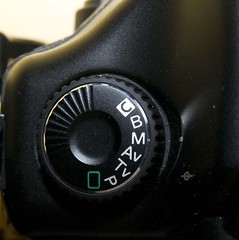
Somewhere on your camera there’s a dial that looks a little bit like this one on my 5D. It will have several settings to choose from, and may have many more than what’s shown in this photo. In order to set the exposure mode, you turn the dial so that the appropriate setting is lined up with the indicator line on the side. The line is a little bit hard to see in this photo, but the camera is in M mode. M is for manual, Magic, Master of the universe, and My favorite mode.

What are all those other modes?

  • Green box: the camera just does everything for me
  • P: program mode, which is much like the green box but a little less neurotic
  • Tv: shutter priority mode
  • Av: aperture priority mode
  • M: manual mode
  • B: bulb mode
  • C: custom function mode (which I’m going to ignore)

I shoot with Canon gear, and therefore I’m most familiar with Canon’s controls. Those are also the cameras that I have sitting around to use as examples. (If anybody wants to send me a Nikon so that they can have equal representation, I’d be happy to go the extra mile.) I believe that Nikon calls their controls Auto, P, S, A, and M for Automatic, Program, Shutter Priority, Aperture Priority, and Manual. Other brands will have very similar functions– if you can’t figure out what they are, consult your manual.

In Auto and P modes, the camera basically just does everything for you. Typically, Auto mode is extremely obsessive about it, and won’t let you change any of the settings on your own. P mode is kind of a laid back version of Auto, one that will set the shutter speed and aperture for you, but not ignore you if you try to change something else.

Aperture priority and shutter priority are the real workhorses, and many people find that they use aperture priority more than anything else. You might too, once you figure out how they work. In aperture priority mode, you pick your own aperture, and then the camera’s meter figures out what shutter speed to use. As you can probably guess, in shutter priority it’s just the opposite– you pick the shutter speed that you want, and then the camera picks an aperture. Pretty easy, huh?

Manual mode is the final mode that you might want to use on a regular basis. In manual mode, the camera keeps its grubby little paws off the settings, and you get to choose both the shutter speed and the aperture. That sounds like a scary amount of power, right? Well, it’s not so bad. The camera’s not going to do any work, but it will still give you information. Even in manual mode, the camera’s meter works just fine, and you can use the display to help you find the right exposure.

Just for completeness, bulb mode is a special manual mode. In bulb mode, you press the shutter button once to open the shutter, and press it again to stop. This seems like a weird thing to do, and you’re right, but it’s occasionally useful for things like taking pictures of stars. You’ll probably never need to use bulb mode, but tuck the information into a corner of your brain in case it ever comes in handy.l

You’re probably wondering how you set the aperture and shutter speed on your camera. Frankly, I have no idea but if you bring it over here I’ll figure it out and tell you. Or, you can grab the manual and look it up. Here’s how mine work:

Canon 5D: There’s a dial right behind the shutter button– it controls the shutter speed. There’s a thumb wheel on the back of the camera that controls the aperture.

Canon Digital Rebel XT: There’s a dial right behind the shutter button. In aperture priority mode, this button controls the aperture. In shutter priority button, it controls the shutter speed. In manual mode, that dial controls the shutter speed. In order to set the aperture in manual mode, you press the top button (labeled Av +/-) on the back of the camera and hold it down while turning the dial. Yes, that’s a little confusing to describe. It’s actually pretty easy to do, and once you get the hang of it you’ll find it quite easy.

Next up, our first exercise!

Next lesson: Exposure modes exercise

8 Comments

Filed under Controls, Lesson

How your camera works– the meter

This is part two of how your camera works, and it’s a little bit more complicated than the first round. I’ll try to keep it as simple as possible, but some of this is pretty close to magic.

As I explained earlier, when you take a picture the aperture closes down part of the way, the shutter opens, and then the sensor records the light it saw. There’s a step that happens before that, and it’s a very important one.

Your camera is surprisingly smart for such a small piece of gear, and it does a lot of sneaky stuff when you aren’t looking. You’ve probably noticed that if you leave the camera in automatic mode, it pretty much just figures out how to take a picture that looks pretty good. Sometimes it guesses wrong, but most of the time it gets pretty close to a good picture. How does that happen?

Your camera has a built-in light meter that measures how much light is coming into the camera. Just before you take a picture, when the shutter button is halfway down, the camera very quickly measures the light coming into the camera and then picks out the settings it thinks will be best for a good picture. If you’re in a dark bar, the camera will want the lens to be wide open and the shutter to be open for a long time. In bright daylight, the camera will want a smaller opening and a quick shutter speed so that the photo doesn’t get overexposed.

MeterIsHappyI’m sure you’ve seen the weird scale thing somewhere on your camera. There’s almost certainly one in your viewfinder, and quite possibly also one on a screen on the top or back of your camera. It usually has numbers that go from -2 to +2, with a bunch of tick marks in between and a line that moves around seemingly of its own volition. That thing is a display of your camera’s meter, and it’s really very simple to understand. The camera moves the line around to let you know if it thinks the shot is going to be underexposed, overexposed, or just right. When the line is right smack dab in the center, as it is in this photo, the camera is very happy about the exposure. That doesn’t mean the exposure will be perfect– cameras are far from perfect at guessing this stuff. They’re pretty good, though, and the camera’s meter will usually be a very good starting point.

If the line is to the right of center, that means the camera thinks that the shot will be over exposed– the photo will have too much light. A much more common situation is that the line will be way over on the far left, which means that there’s not enough light and the photo will be underexposed. In automatic modes, the camera will do its very best to get that line in the middle of the display, but sometimes it just won’t be able to even at the slowest shutter speed and the widest aperture. Later we’ll talk about ways of handling that. For now, just try to get more light if you can.

Modern cameras generally have very sophisticated meters with all sorts of different modes. You’ll often hear terms like spot, zone, center-weighted, evaluative, partial, super duper, whizbang, and confusing. Camera review sites will list the various modes as badges of honor, and gear geeks will discuss them ad nauseum.

Don’t worry about those for now, and just leave yours set to whatever the camera’s default is. Right now, all you really need to know about metering is that your camera knows how to measure light and pick out shutter speeds and apertures based on the light it sees.

OK, I’ll tell you just a little bit more. Your camera’s default mode is probably one where the middle of the picture matters a lot, the edges barely matter at all, and the stuff in-between matters a little bit. That’s because most people put the important stuff in the middle of the picture. Somewhere down the line we’ll talk about different metering modes and why you might care, but that’s pretty far away. It’s entirely possible that you’ll never have a reason to use anything but the camera’s default mode.

Next lesson: How your camera works– exposure modes

6 Comments

Filed under Controls, Lesson

Shutter speed, why you care

FourLittleAngelsOK, those spinning light pictures are kinda cute, but why do you really care about shutter speed if you aren’t trying to capture fire dancers? In short, the shutter speed gives you artistic control of the way your camera captures motion.

One day at work, I heard jets flying very low over my San Francisco office. I happened to have the camera on my desk, so I grabbed it and ran up to the roof to see what was causing the ruckus. I’d completely forgotten that it was Fleet Week in San Francisco, and the Blue Angels were putting on a show for us. I grabbed my longest telephoto lens and started snapping. Since the planes were going by at several hundred miles per hour, I needed a very fast shutter speed to avoid blurriness. This photo was taken at 1/1600 sec, which is pretty speedy.

What if you want to take a picture of your son’s little league game. He’s the pitcher, so of course you want to capture him for posterity. What shutter speed should you use? Well, it depends. Do you want to freeze him in motion just as the ball flies away from him? If so, you should probably use a shutter speed of around 1/500 in order to freeze the motion. Do you want to capture blur from the motion of his arm and see the ball traveling through the air? To achive this result, use something slower, maybe 1/80 or 1/60.

JohnInMotionHere’s a neat picture of my drummer friend John. The shutter speed on this was 1/80 sec, which froze almost everything the picture but captured the motion of his drumsticks and his hands. This produces a much more interesting and dynamic shot than if the drumsticks had been completely unblurred– you can almost hear the crash of the cymbal as the fast-moving drumstick comes down on it.

There’s also an interesting remedial component to shutter speed that you should be aware of. Have you ever taken what you thought was a wonderful photo, only to find out later that it was shaky and blurry? It turns out that humans aren’t all that great at holding perfectly still. When we try to take a picture with a slow shutter speed, it doesn’t really matter what our subject is doing. The photographer (that’s us!) wiggles and jiggles around so much that even a picture of a rock will be blurry.

If you’re holding the camera in your hand rather than supporting it on a tripod or some other solid surface, you need to use a fast enough shutter speed that your own motion won’t blur the photo. Some photographers are better at holding still than others, but everybody gets camera shake if their shutter speed is too slow. A general rule of thumb is that your shutter speed should be no slower than the focal length of your lens. For example, if you’re using a 50mm lens, use 1/50 or faster. If you’re using a 200mm lens, use 1/200 or faster. Unless you have nerves of steel, that’s the absolute slowest that you should try to hand-hold a shot. Even you might not be quite that steady; it pays to experiment and figure out how steady your own hands are.

IMG_8485Newer image stabilizing lenses will let you exceed that guideline, but they’re relatively expensive, and they aren’t the cure-all that some people make them out to be.

Thus far, we’ve pretty much just focused on reasons that you might want a fast shutter speed. What about a really slow one? Fireworks are one example. You need a tripod or some other way to stabilize the camera, but fireworks are surprisingly easy to shoot. For this shot, I set the shutter speed to 4 seconds and then did my best to time the shutter so that it opened just before an explosion.

Here’s another great example. Noted nature photographer Joe Decker uses a slow shutter speed to capture the movement of water in this stunning image. Incidentally, Joe has graciously allowed me to use some of his photographs as illustrations on this site. You should check out his work.

Next lesson: How your camera works– the meter

9 Comments

Filed under Lesson, shutter speed

Shutter speed, how it works

In the last entry I said that there were three basic things that determined exposure: shutter speed, aperture, and ISO. Shutter speed is the first thing we’ll discuss, since it’s easy to understand and its effects are obvious and intuitive.

8As I explained in a six-year-olds view of your camera, there’s a sensor at the back of the camera that records light. This sensor is jam-packed with light-sensitive gnomes who do nothing but wait for light to hit them and then record whatever light they see. Most of the time these gnomes are very bored, because there’s a curtain in front of them that blocks out all the light. That curtain is called the shutter.

When you press the button on your camera to take a picture, the shutter opens briefly (or usually briefly, at least) and then closes again. While the shutter is open, light falls on the sensor gnomes and they excitedly write down what they see. In scientific terms we call this taking a picture.

30If the shutter is open for a long time, a lot of light hits the sensor gnomes. If it’s only open briefly, the gnomes get correspondingly less light. The amount of time the shutter is open is called, amazingly enough, the shutter speed.

125 Shutter speed is expressed in fractions of a second, and is most commonly in the range of about 1/30 sec to 1/500 sec, though it can range from many seconds up to the maximum speed of your camera– frequently 1/2000 or 1/4000 of a second. Your camera may identify the shutter speed that way, but more commonly it will only use the lower number. On my Canon, shutter speeds are displayed as 30, 100, 500, etc. Those mean 1/30, 1/100, and 1/500 second respectively. For slower shutter speeds, my Canon uses a slightly different display: 1/4 sec is displayed as 4, but then it goes to 0”3, which means .3 seconds, then 0”4, 0”5, 0”6, 0”8, 1”, etc. 1” is one second, of course. From there it keeps climbing up to 30”, which is 30 seconds.

The neat thing about shutter speed is that it can be used to display motion in your photographs. If you use a really fast shutter speed, you freeze whatever action is happening. Using a slow shutter speed will let you capture motion blur.

500In order to illustrate this, I stuck my camera on a tripod and took a series of photos. I used a glow poi (a light-up ball on a string) and spun it in circles while taking a sequence of pictures at different shutter speeds. In the first picture, taken at 1/8 of a second, you can clearly see the motion of the ball as it sweeps around its arc.

At 1/15 of a second, there’s still motion but less of the arc is visible. At 1/125 sec the ball just looks like a blur, and finally at 1/500 sec the ball is completely frozen in its tracks.

That’s how shutter speed works, in a nutshell. Next, we’ll see some real-world examples of why you might want to use a specific shutter speed.

Next lesson: Shutter speed, why you care

2 Comments

Filed under Lesson, shutter speed

Three things that go into exposure

Too Bright As we learned before, when you take a picture a few things happen quickly. First, the aperture closes to block some of the light that’s coming into the camera. Second, the shutter opens and closes. As soon as that happens, the magic gnomes on the camera’s sensor record whatever light they saw when the shutter was open.

I’m sure you’ve taken some pictures that came out way too dark, or maybe even completely black. You’ve probably also taken some that were really light and washed out. We call those dark pictures underexposed, since they didn’t get enough light. The way too light ones are called… can you guess? That’s right, overexposed! Give yourself a shiny gold star.

You’ll see three little bears next to the text in this article. The first one is too bright– he’s overexposed. The second one is too dark– she’s underexposed. Baby bear is at the bottom– he’s juuuuuuusssttt right. IF you go through all of the lessons on this site and do all of the exercises, you’ll know what it takes to get all of your pictures to be just like baby bear.

Too Dark There are three basic things that go into the equation for how a picture will be exposed. The first is how long the shutter is open– if it’s open for a long time, a lot of light gets in and lands on the sensor. If it’s only open for a very short period of time, a lot less gets in. Because photographers like fancy schmancy terms, we call this shutter speed.

The second thing that controls exposure is how big the aperture is. If it’s closed down so that there’s only a tiny hole, not much light gets in. If it’s wide open, a lot more light comes in and lands on the sensor.

If you can’t make sense of how aperture works, imagine that you’re in a plain room with no lights at all… not even the glow of a computer screen. (Stop shaking… it’s an imaginary room.) All of the light in this room comes from one window that faces out to a bright sunny day. If the room has a really big window, then the room will be bright and sunny. On the other hand, if it has a teeny tiny window, the room will be pretty dark. The aperture on your camera is like the only window the camera has. If the aperture is big, lots of light gets in. If it’s small, only a little bit of light sneaks through.

Just Right The third thing that goes into exposure is called ISO, and it’s a measure of how sensitive the sensor is. Remember our sensor gnomes? Think of them as light microphones. If the camera is set to a very high ISO (e.g. 800 or higher), the gnomes will be able to record small amounts of light. At low ISOs (100, 200) the gnomes need a lot of light.

Right about now, you’re probably thinking that you want the gnomes to be as sensitive as possible, but that’s not true. For now, just trust me on this, and I’ll explain later.

Next lesson:  Shutter speed, how it works

1 Comment

Filed under Exposure, Lesson

How your camera works, in overly simplified terms

In order to understand photography, you need to have a basic understanding of how your camera works. Don’t get scared! Even a six-year-old could understand this. In fact, here’s what your camera might look like if a six-year-old used Paint to draw it:
A six-year-old's view of your camera

At the very back of the camera there’s a sensor that records whatever light hits it. We don’t really care much about how this happens right now, since it doesn’t matter. For our purposes, let’s pretend that there are millions of magic camera gnomes that live on the sensor rubbing shoulders with each other and spend all their time waiting for a little bit of light to reach them. When they see light, they get excited and record exactly how much light they see.

If the gnomes always got light they’d get tired and stop working, so right in front of the camera is a shutter. Think of this as a curtain that’s closed almost all of the time, but opens up for a brief moment when you want to take a picture.

Whenever we take a picture there’s a lens attached to the front of the camera, and that’s where the light comes in. The lens has a lot of glass in it arranged in special ways so that everything focuses just so, but we can treat this as magic too. In addition to the glass, there’s a round opening called the aperture or diaphragm. The diaphragm controls how much light gets into the camera– open wide and a lot gets in. If it closes down to a tiny pinhole, only a little bit of light gets through to the gnomes. When you aren’t taking a picture the diaphragm is always open as far as it can be, and when you take a picture it closes down to let the right amount of light in.

When you take a picture, a few things happen really quickly: the diaphragm squeezes down to block out some of the light, the shutter curtain goes up very quickly, the gnomes get all excited and write down what they see, and then the curtain closes and the gnomes go back to waiting.

And that’s it in a nutshell– the magic of photography. In the next few lessons, we’ll learn how to control the aperture, the shutter, and the elves in order to take good pictures.

Next lesson: The three things that go into exposure.

14 Comments

Filed under Lesson