In Why are there spots on my picture? I showed several examples of sensor dust, and promised to tell you what to do about it. And then I procrastinated. No more! Here’s my simplified guide to cleaning your sensor.
Before I go very far, let me say this: whenever you clean your sensor, you run some risk of damaging it. If you’re careful and pay attention to what you’re doing that risk is very small, but if you’re not comfortable with the methods outlined here then you should take your camera to a reputable camera shop rather than doing it yourself. The author disclaims all responsibility for any damage you might do to your camera.
Have I scared you? Sorry about that. I’ll do my best to make you less scared. Some methods of cleaning the sensor are far safer than others, and those will do a good job on most dust. Occasionally you’ll wind up with really stubborn, sticky dust that can’t be removed without heavy artillery, but the vast majority of it is pretty wimpy and will go away when you tell it to.
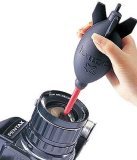 Before we go on, there’s one tool that you’ll need for this project, and that’s some sort of a blower bulb. This is a small rubber gizmo that you will use to blast the pesky dust away from your sensor. The most popular one for this purpose is the Giottos Rocket Air Blaster, and I’m quite fond of mine. It’s powerful and works extremely well, and you get all of that wonderfulness for less than ten bucks. Another option is to go to the drugstore and pick up a bulb-style ear syringe. These cost a couple of bucks and will do a passable job, though the Giottos really is much better.
Before you attempt to clean your sensor, read your camera’s manual for instructions on sensor cleaning. My Canon manuals say to always have a fully-charged battery or have the camera plugged into an AC adapter when you clean the sensor. I don’t know much about Nikons or other dSLRs, but I’d imagine they’re the same.
Here’s a quick outline of what we’re going to do:
- Figure out how to put your camera into cleaning mode
- Take the lens off of the camera
- Put the camera into sensor cleaning mode
- Quickly blast the dust off of the sensor
- Turn the camera off to get it out of cleaning mode
- Put the lens back on
That doesn’t sound too hard, does it? OK, let’s go.
First off, read the manual and then look through your menus to see how to put the camera into sensor cleaning mode. You don’t want to put it into this mode yet, but you know where the setting is and be ready to go.
The next step is so obvious that it doesn’t require explanation– remove your lens. I make it a habit to always keep the opening of the camera body pointed down whenever I don’t have a lens on the camera– this utilizes an amazing force called gravity to help keep dust out of the camera. It probably doesn’t do all that much good, but every little bit helps.
Now, have your blower bulb handy, then put the camera into sensor cleaning mode. You should hear the mirror flip up so that the sensor is accessible.
 Here comes the fun part: keep holding the camera so that it’s facing down, and use the blower bulb to blast air onto your sensor a few times. This should dislodge most of the dust that’s hanging around. If you keep the opening pointed down, that gravity stuff will help keep the dust from falling back onto the sensor. Work quickly, but don’t hurry… it’s better to have to repeat the process a second or third time than to work too fast and bump something you shouldn’t.
Now, turn the camera off to take it out of cleaning mode, or alternately do whatever your manual told you to do. Put the lens back on the camera so that you don’t let more dust in.
A few words of caution:
- Be careful! You don’t want to touch anything with the tip of the blower.
- Do this in as dust-free an environment as possible
- Absolutely do not use compressed air for this– it contains propellants that you don’t want inside your camera
When you’re done, take another test shot and you should see that much of the dust is gone. You almost certainly won’t get all of it, but that’s OK– I don’t think I’ve ever had a completely dust-free sensor in my life. Small amounts of dust are impossible to see in most images, and when they do show up it’s almost always possible to get rid of them with a tiny amount of Photoshopping.
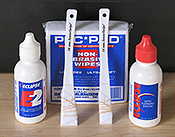 What if you have serious stuck-on dust that won’t go away? There are several methods at your disposal that require a bit more caution than a blower bulb but can remove even the most stubborn dust. Probably the best is wet cleaning. This is done with materials that are specially designed to avoid leaving residue on your sensor. (Please put that Windex down right now.) The kit I have is sold by Copper Hill Images, and I’ve been quite pleased with it. I do most of my cleaning with a blower bulb, and when that doesn’t work I resort to wet cleaning. Copper Hill has an excellent tutorial on using their products– it’s a bit chatty, but contains a lot of good information.
Another method that some people swear by is a specially-designed electrostatic brush. I personally haven’t had very good luck with cleaning brushes, but that may just be my incompetence with using them. Your mileage may vary.
The Dust-Aid kit is an interesting new product– it uses a special adhesive pad to clean the dust off of your sensor, sort of like a lint roller for your sensor. I haven’t used one yet, but I’ve heard mixed reviews. My guess is that they’ll be somewhat more thorough than a blower, and not quite as good as wet cleaning.
Sensor cleaning has been written about a lot, and everyone has an opinion about it. If you do a web search for “cleaning dslr sensor” you’ll find a lot of excellent advice and a wide variety of opinions. To my way of thinking, the blower bulb method is the least invasive and should always be tried before you go onto something more hardcore.
Many new cameras try to automatically clean the sensor by vibrating it every time the camera is turned on or off. I don’t have personal experience with those, but others have reported that camera self-cleaning will reduce the amount of dust you get, but won’t completely eliminate it. You’ll still need to clean your sensor by hand from time to time.
Do your best to prevent getting dust into your camera– always keep a lens or a body cap on the camera, and when you change lenses do it quickly with the camera pointing down, and in as clean an environment as possible. However, when the inevitable dust shows up and starts causing problems, it’s not the end of the world.


 Stop Shooting Auto!